Bambu RFID scanner on Flipper Zero
January 17, 2026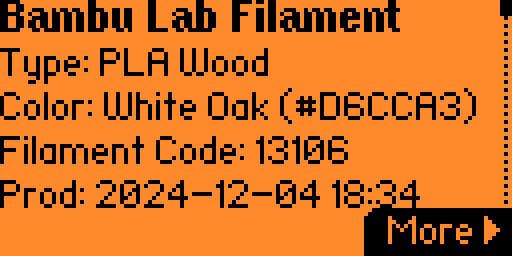
3D printing is fun. One common situation for anyone who owns a 3D printer is that you eventually end up with a growing stack of filaments at home.
These spools come in many combinations of colors and materials, and sooner or later you'll need to top up a spool that's running low. The problem is that Bambu filament labels only show the material and variant—such as PLA Basic, PLA Wood, PLA Matte, or ABS—but not the color code or color name. This makes it surprisingly tedious to figure out which exact filament to reorder. You either dig through old purchase receipts or manually try to match colors on the website.
If you have a Flipper Zero with the flipper-bambu plugin installed, you can now easily scan a Bambu filament spool via its RFID tag to retrieve the color code, along with other useful details such as temperature configurations, specifications, and production date—information that isn't normally visible.
You can even scan the filament through the box, which is especially useful when you just want to check the production date without opening it.
How to install
- Download
bambu_parser.falfrom the Releases page. - Copy it to your Flipper Zero SD card at:
/ext/apps_data/nfc/plugins/(You can write to the card directly or via qFlipper.) - Restart the NFC app and scan the spool using the native NFC app.
Once the Bambu tag is read, you can skip the key-matching step on the next screen.
Credits
- Filament database sourced from queengooborg/Bambu-Lab-RFID-Library
- Tag format research from Bambu-Research-Group/RFID-Tag-Guide